Case study · Product
The Wishlist Department
A no-spoilers gift list for whole families. It started as a fix for my own family's Christmas and grew into a product with checkout, renewals and a help center. I owned the product decisions, the testing and every release. AI wrote the code with me.
The problem
Every year our family ran gift lists the same way: screenshots, a group chat, someone's Notes app, and mostly, shared Amazon lists. Amazon lists solved one problem and created another. Everyone was limited to what they could find on Amazon, so the small-shop gift, the experience, or the "just give me a call about this one" never made it onto a list.
Meanwhile, two people bought the same thing, someone couldn't find the list at all, and the kids could see half of it.
In ops terms: no single source of truth, no ownership, and the customer could see the backlog.
Who it's for
The organizer
Usually a parent. Sets up the family, keeps lists tidy, and wants zero tech support calls from Grandma.
The list owner
Kids and adults adding what they want, from any store, without seeing who's buying what.
The gift-giver
Grandparents, aunts, friends. They just want to see what's left and not double up. No account, no app.
How it came together
I didn't write a spec and disappear. Each version went to my real family, and then to friends' families. I watched what broke, and the next version answered it.
One private page for our Christmas
A single list my daughter could edit, with a family link where anyone could tap "I'll get this." It soon grew into a hub with a list for every person, a workshop for me, visit counts, and "here now" dots, because the family kept asking "who else is on this?"
From family page to product
Friends asked for one, so I rebuilt it to work for any family: Stripe checkout that opens a department on its own, a landing page, pricing, refunds and privacy policies, renewals and lapses, Secret Santa and anniversaries. I renamed the parts to sound like a store, not software: the department, the workshop, "my list" and the gifted shelf.
Making it easy to understand
When family members got confused, I added a "How it works" page linked from every screen, guest links for people outside the family (a baby shower invite, say), and a move of our own family into the product so I'd be using exactly what customers use.
A redesign picked from five options
I had five design directions mocked up, chose the parts I liked from three of them, and had them combined into one look ("Counter Mix"), plus occasion themes and decorations.
Gifting start to finish, then a gap hunt
Price ranges, group gifts with a private chat, and a thank-you list. Then real use by my family surfaced the bugs below, and I closed them one by one.
Iterating on what the family noticed
A usage dashboard, then quick rounds: tightening the no-spoilers promise, a "My Dibs" tab, dibs that follow you between devices, dropping a wish category nobody needed, bringing back the guestbook and themes that stay put. Each round started with something someone saw and ended in a release. More on that below.


How the bugs got caught
None of these showed up in a demo. They showed up when my family used it on our own kids' lists, and in reviews where I asked "what else could go wrong?" and kept asking.
Found by: testing a group gift on our baby's list. Cause: opening a baby's list on my phone made the phone think it was the baby. Decision: lists for kids under 5 are parent-run and never claim a phone, and a phone set up as someone else now asks "Is this your list?" before switching.
Shipped in change #84
Found by: reading the visitor log. A baby can't check a list. Decision: visits to an under-5's list now read "A parent looked at…".
#84
Found by: two of us testing a group gift on two phones. Decision: invites and group chat messages now appear live on the family page without a refresh. I also checked what the extra traffic would cost on our hosting plan.
#86, #87
Found by: using it. The only route was a header link nobody would guess. Decision: a clear "Back to the family" button.
#85
Found by: thinking through who gets invited to split a gift. The first fix was a "kid" checkbox, and I rejected it as one more thing for parents to maintain. Decision: use the birthday the family already enters. Under 16 is never asked to split, and under 5 is parent-run.
#80, #82
Found by: a deliberate review after the obvious bugs were fixed. It surfaced four: a wish deleted after someone bought it, a wish edited after someone claimed it, an invite declined in silence, and a phone lost with dibs on it. Decision: buyers get a heads-up when a wish they claimed is removed or changed, declines post to the group chat, and the organizer can release a dib. For lost phones I asked for the reasons not to tie dibs to a person before choosing the simpler fix.
#88, #89
Found by: moving our family to the new version. Everyone would need a private link resent. Decision: a "Which one are you?" picker on the one family link. The first proposal was organizer approval, and I pushed back: an approval button proves nothing if I can't tell who actually tapped the name. So it became a confirm step plus a personal code, with resets in the workshop.
#91
Found by: asking for gaps again right after shipping the picker. Anyone already set up without a code could have their name taken, and an organizer who forgot their code had no way back. Decision: "My list" asks for a code, and "Forgot your code?" emails the buyer a one-time reset.
#92
Iterating in rounds
Once my family was using it for real, the work changed shape. Day 5 wasn't one big build. It was a run of small rounds, each started by something I noticed or a family member told me. I ran every round the same way:
- I write down what I seeThe problem in plain words, not a solution. "It told Grandpa he used another phone, but the first one was his computer."
- I settle the ruleBefore any fix, I decide what the product should do, which often means answering the one question that changes the fix.
- I look before we buildAnything new starts as a mockup I can react to on my phone.
- I ship it smallOne change at a time, tested on a demo family, with before-and-after notes I review.
- I check it liveI release it myself, use the real thing, and whatever I notice starts the next round.
Eight of those rounds, each one released on its own:
I noticed the call dibs and split buttons showing on my own list. Hiding the buttons was the first fix, but that wasn't enough, because the owner could still see "Dibs: Sam." That made me state the rule properly. The owner never learns whether anything was claimed, split or chipped in on, and their page looks identical either way. So the server now recognizes the owner on the family link, sends them to their own "my list" page, and refuses dibs on your own list.
#105
My grandfather signed in on his computer, then his phone, and was told he'd "used another phone." Every message now says "device."
#106
I wanted a claimed birthday gift to move to the gifted shelf only after that person's own birthday. It turned out it already worked that way. Checking it showed me the real problem: an "Anytime" option that had no date to move on. I weighed keeping it against removing it and cut it, so every wish is for an occasion and defaults to the person's birthday.
#107
Givers had no single place to see what they'd claimed. I wanted it to live inside the app, so I had a mockup made first and approved it as it was. It became a "My Dibs" tab with buy links and "mark bought." Then I asked myself whether it would only show dibs from the device I'd used. It would have, so I changed the model: dibs belong to the person and follow them to any device they've signed in on.
#108
I went looking for the guestbook from our original family page and it hadn't come across in the move. I brought it back on every list, carried over the old signatures, and gave owners a way to remove any they don't want.
#109
The highlighted tab kept changing color between pages. The first guess was an older-iPhone display issue, so a small fallback went out. Testing it again, I pinned down what was really happening: a theme someone picked on the family page didn't carry over to their own list, which showed my organizer theme instead. Now your own pick follows you, and my choice as organizer is only the default for people who haven't picked one.
#110, #111
After all that, the "How it works" page was out of date and had empty space on desktop. I had it brought in line with every change, with fresh screenshots including My Dibs and a layout that keeps each screenshot beside the steps it shows.
#112
Key product decisions
No accounts, no app
One private family link. Each person taps their name and picks a short code.
Why: the hardest user is the least technical one. Every sign-up screen loses a grandparent.
Spoiler protection enforced on the server
The list owner's view never receives dib data at all, rather than just hiding it. If the owner opens their own list from the family link, the server recognizes them and shows their "my list" page, which looks the same whether or not anything was claimed.
Why: the core promise of the product can't depend on nobody peeking.
Any store, not just one
Wishes can link anywhere, or just be a note.
Why: being limited to one retailer was the original pain.
Every occasion, not just Christmas
Birthdays ("Mia turns 8"), Christmas, Hanukkah, Valentine's Day, Mother's and Father's Day with the right dates for US and Australian families, anniversaries and custom dates.
Why: a Christmas-only product gets used one month a year. Year-round occasions make an annual price make sense.
Dibs belong to people, not devices
Once someone has said who they are on a device, their dibs, undo and My Dibs list follow them to it.
Why: families call dibs on a phone at dinner and shop on a laptop later. Tying dibs to one device made the list look wrong on the other.
Every wish is for an occasion
No "Anytime." A wish defaults to the person's own birthday.
Why: the gifted shelf needs a date to know when a gift has been given. A category with no date just left gifts stuck on the list.
Age rules from data families already give
Birthdays decide who can be asked to split a gift and whose list is parent-run.
Why: every extra setting is something an organizer forgets to update.
Warm language, not software language
The department, the workshop, "my list", the gifted shelf.
Why: it should feel like a store you like walking into, not a dashboard.
Working with AI
I built this with Claude, an AI model, writing the code. My job was the one a product manager does with an engineering team:
Set the problem, not the solution
I described what my family hit and what "fixed" meant, then judged the options against it.
Ask for the visual
Before building, I asked for mockups (five redesign options, a thank-you flow) and decided from what I could see.
Push back
I rejected the kid checkbox and the approval step, and asked for the downsides before choosing a fix.
Find the real question
Most requests hid a fork, like whether dibs belong to a device or a person. Spotting it and deciding it was my job, and the fix changed to match.
Own the release
Every change came to me as a reviewed request with before-and-after notes. Nothing reached customers until I merged it.
Made to be customized
Families make it theirs: occasion themes that switch automatically with the next date, each upcoming-date card in its own occasion's colors, just-for-fun themes, per-list looks, a personal theme that follows you to your own list, Secret Santa draws, and guest links for people who only want to shop.


Gifting, start to finish
Price ranges
Wishes carry a rough price range, and givers can filter by budget.
Group gifts
Split a big wish, invite the grown-ups you want, and plan it in a live private chat the list owner never sees.
Thank-you list
After the occasion, the gifted shelf becomes a thank-you checklist with a ready-to-send note, and givers see when they've been thanked.
My Dibs
One tab with everything you're buying across every list, buy links, and "mark bought", on any device you've signed in on.
Guestbook
Family sign each other's lists with an emoji and a note, so the list owner knows who stopped by without learning what they picked.
The parts nobody sees
- Self-serve setup. Checkout creates the family's department automatically and emails their link.
- Recovery. "Lost my link", "Forgot your code?", code resets, and an organizer button to release a lost phone's dibs.
- Renewals and lapses. Self-serve cancelling, and a department closes on its own when a year runs out.
- Gifting. A way to give a department to a friend without them entering payment details.
- Pricing. $19 a year, with $15 a year for good for the first 25 founding families.
- Help. A "How it works" page linked from every screen, kept in step with each release.
A note on the numbers: the request numbers you'll see (#84, #92) run past 100 because the wishlist department shares one code repository with the rest of standups & snacktime, including the career guides, the changelog and the status page. Of those requests, 63 were for the wishlist department.
Measuring what matters
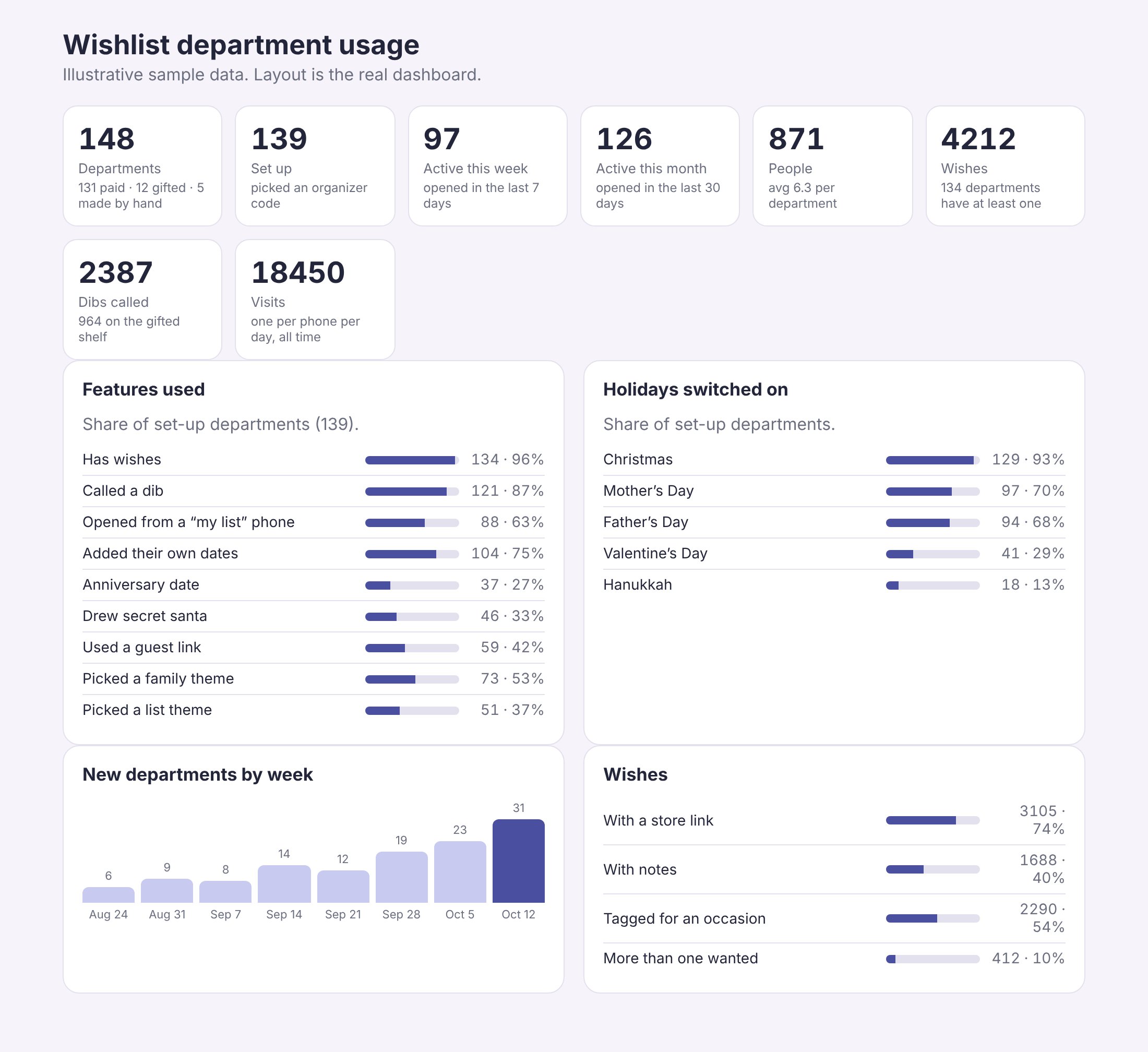
Before launch, I built a private usage dashboard so the next build is decided by what families actually do. It tracks counts only: no family names, wishes or emails.
Activation
Did the family finish setup and add a first wish? Departments that never get set up point to onboarding problems.
Engagement
Active this week and month, and dibs called. Dibs are the moment the product does its job.
Feature adoption
Which features get used (Secret Santa, group gifts, guest links, themes, custom dates) decides what gets more investment and what gets cut.
Seasonality
Which holidays families switch on shows whether "every occasion" is real or if it's still a Christmas product.
What the first usage data tells me
The first six departments gave me an initial view of activation and engagement. Five completed setup, but only one had added wishes at the time of measurement.
That's a signal worth investigating, not proof that onboarding is broken.
My next priority is understanding the gap between completing setup and creating the first wish. I'll look at whether users understand the next step, whether they're waiting for family members to participate, or whether the experience introduces unnecessary friction.
Rather than build more features immediately, I want to understand what gets families to their first meaningful interaction.
What's next
- Soft launch with founding families, then a public launch.
- Close the gap between setup and the first wish before adding features.
- Then let the feature adoption numbers decide the next build.
Count me in →